Support our educational content for free when you purchase through links on our site. Learn more
15 Computer Vision Challenge Datasets to Know (2026) 🔍

Computer vision challenge datasets are most useful when their task, labels, evaluation rules, and real-world conditions match your project. Start with a benchmark that fits the job—such as CO for everyday-object detection or Cityscapes for road-scene segmentation—then check performance on data that reflects where your model will actually be used.
We’ve seen teams get excited by a leaderboard score, only to discover that the benchmark’s camera angles, class balance, or image quality barely resemble their own data. That’s why this guide compares 15 dataset categories, from handwriting and medical imaging to underwater scenes, aerial imagery, and 3D point clouds—and explains what each can and can’t tell you.
Key Takeaways
- Choose datasets by task and deployment conditions, not by popularity or size alone.
- Separate datasets from benchmarks: a benchmark adds defined splits, metrics, and evaluation rules.
- Match annotations to the problem: classification labels, boxes, masks, keypoints, video tags, and 3D labels serve different needs.
- Check the official license, label definitions, and split protocol before downloading or using data commercially.
- Guard against leakage and bias: split by subject, video, location, or production batch when appropriate.
- Treat leaderboard results as evidence, not a guarantee. Validate the final model on independent data from its intended environment.
Table of Contents
- ⚡️ Quick Tips and Facts
- 🧭 Computer Vision Datasets: Background and Evolution
- 🗂️ Computer Vision Dataset Types and Top Benchmarks
- 1. Image Classification and ImageNet-Style Datasets
- 2. Object Detection and Recognition Datasets
- 3. Semantic, Instance, and Panoptic Segmentation Datasets
- 4. Facial Recognition, Expression, and Landmark Datasets
- 5. Human Pose Estimation and Keypoint Datasets
- 6. Action Recognition and Video Understanding Datasets
- 7. Handwriting, OCR, and Document Understanding Datasets
- 8. Medical Imaging and Biomedical Vision Datasets
- 9. Aerial, Satellite, and Remote-Sensing Image Datasets
- 10. Underwater and Marine Vision Datasets
- 11. Autonomous Driving and Road-Scene Datasets
- 12. 3D Objects, Point Clouds, and Scene-Understanding Datasets
- 13. Industrial Inspection and Defect-Detection Datasets
- 14. Agriculture, Wildlife, and Environmental Image Datasets
- 15. Multimodal, Vision-Language, and Synthetic Datasets
- 🏆 Computer Vision Challenges, Leaderboards, and Competitions
- 🔎 How to Choose the Right Dataset for Your Vision Task
- Match the Dataset to Your Task and Deployment Setting
- Check Dataset Size, Diversity, and Class Balance
- Inspect Annotation Quality and Label Formats
- Review Licensing, Privacy, and Responsible Use
- 🛠️ Downloading, Preparing, and Managing Datasets
- Popular Dataset Hubs and Tools
- Common Image and Video Annotation Formats
- Data Cleaning, Augmentation, and Preprocessing
- Train, Validation, and Test Splits
- 📏 Evaluation Metrics and Benchmark Best Practices
- ⚠️ Dataset Bias, Leakage, and Common Pitfalls
- 🔮 Emerging Trends in Computer Vision Benchmarks
- ✅ Conclusion
- 🔗 Recommended Links
- ❓ FAQ
- What are the best computer vision challenge datasets for beginners?
- Where can I download computer vision datasets?
- What is the difference between a dataset and a benchmark?
- Are computer vision datasets free for commercial use?
- How do I create a reliable train-validation-test split?
- Which dataset should I use for object detection or segmentation?
- 📚 Reference Links
⚡️ Quick Tips and Facts
Computer vision challenge datasets give us shared examples, labels, and evaluation rules for testing models. They’re useful for training, but their real superpower is making results comparable—provided everyone follows the same split and scoring rules. For a deeper look at how benchmark design affects model comparisons, see our guide to computer vision benchmarks.
| Quick fact | What it means in practice |
|---|---|
| A dataset is not automatically a benchmark | A benchmark typically adds a task definition, fixed data split, metric, and evaluation protocol. |
| One dataset rarely answers every question | CO is useful for everyday-object detection and segmentation; it won’t tell you how your model handles your factory’s unusual defects. |
| Annotation type matters | Classification labels, bounding boxes, pixel masks, keypoints, and 3D boxes support different tasks. |
| Bigger isn’t always better | A smaller, carefully labeled dataset from your deployment environment can beat a huge, mismatched corpus. |
| Test-set leakage can flatter results | Keep test labels and examples away from training, tuning, and repeated informal inspection. |
| Licensing deserves an early check | “Available to download” does not mean “approved for commercial use.” Read the dataset’s own terms. |
| Leaderboards need context | Compare task, split, metric, model input, and evaluation rules—not just the headline score. |
Our quick picks: ImageNet for classic image classification research; CO for general detection, segmentation, and keypoint tasks; ADE20K for scene parsing; Cityscapes for urban street scenes; and KITI or nuScenes for autonomous-driving perception. These are starting points, not universal winners. Their official sites and task documentation explain the details: ImageNet, CO, ADE20K, Cityscapes, KITI, and nuScenes.
A practical rule from our team: Before downloading a dataset, write down the model’s task, deployment environment, acceptable error types, and intended use. If you can’t describe those in a few sentences, dataset selection is probably premature.
🧭 Computer Vision Datasets: Background and Evolution

Computer vision datasets have grown from small collections designed to test narrow tasks into large, richly annotated resources spanning images, video, depth, LiDAR, radar, language, and more. That shift changed the central question from “Can a model recognize this object?” to “Can it do the right thing across varied scenes, rare cases, and unfamiliar conditions?”
Early challenges such as PASCAL VOC helped standardize object-classification, detection, and segmentation experiments. ImageNet, introduced as a large-scale visual database organized around the WordNet hierarchy, pushed image classification toward much greater scale. Later datasets such as CO emphasized objects in everyday contexts, with multiple objects often interacting or overlapping.
The progression is not simply small to large. It is also single label to dense annotation, still image to video, and RGB-only to multimodal sensing. The Computer Vision Foundation’s COVE dataset repository illustrates that breadth: its catalog spans recognition, segmentation, tracking, pose, 3D reconstruction, robotics, image restoration, and multimodal tasks.
| Dataset era or direction | What changed | Example resources |
|---|---|---|
| Foundational image classification | Large collections and standardized categories made classification comparisons practical | ImageNet |
| Object-centered scene understanding | Bounding boxes, masks, keypoints, captions, and contextual objects expanded evaluation | CO |
| Dense scene parsing | Pixel-level labels helped evaluate understanding of foreground and background | ADE20K, Cityscapes |
| Long-tail recognition | More categories and attention to rare classes challenged models beyond frequent objects | LVIS, Open Images |
| Multimodal perception | Cameras joined LiDAR, radar, depth, GPS, and other sensors | KITI, nuScenes, Argoverse |
| Specialized and real-world domains | Medical, aerial, marine, industrial, and ecological tasks received dedicated datasets | BraTS, iSAID, SUIM, MVTec AD |
There’s a catch, though. Each generation of datasets brings new capabilities and new ways to overfit. A model that tops an established benchmark may still stumble on a different camera, region, hospital, or season. We’ll return to that problem when we discuss dataset bias and leakage.
🗂️ Computer Vision Dataset Types and Top Benchmarks
The best dataset depends on what your model must predict. Classification asks “what is in this image?” Detection asks “what is it, and where?” Segmentation asks “which pixels belong to what?” Video and 3D tasks add time, motion, and geometry.
The catalog below is a practical map, not a claim that one benchmark is universally best. Always verify the dataset’s current version, access procedure, annotation specification, and license on its official page.
| Task | Typical annotation | Common evaluation |
|---|---|---|
| Image classification | One or more labels per image | Accuracy, top-k accuracy, macro-F1 |
| Object detection | Class-labeled bounding boxes | Average precision, recall |
| Semantic segmentation | Class label per pixel | Mean intersection over union (mIoU) |
| Instance segmentation | Separate mask for each object | Mask AP |
| Pose estimation | Human or object keypoints | Keypoint AP, PCK |
| Video action recognition | Clip-level or frame-level action labels | Accuracy, mAP |
| OCR | Text strings, polygons, or text boxes | Character/word error rate, precision and recall |
| 3D perception | 3D boxes, points, depth, or poses | 3D AP, IoU, distance-based metrics |
1. Image Classification and ImageNet-Style Datasets
For image classification, datasets assign labels to whole images or to individual regions. ImageNet remains a central reference for large-scale visual recognition, while CIFAR-10 and CIFAR-100 are compact options for teaching and quick experiments. MNIST and EMNIST are useful for handwritten digits and characters, though their tidy grayscale images are a long way from a messy phone-camera feed.
| Dataset | Useful for | Strength | Limitation |
|---|---|---|---|
| ImageNet | Large-scale image classification and pretrained representations | Broad, established research ecosystem | Not a substitute for specialized-domain evaluation |
| CIFAR-10/100 | Tutorials and rapid model comparisons | Small, accessible, widely supported | Tiny images and limited real-world complexity |
| MNIST | Digit recognition and introductory experiments | Simple baseline with consistent images | Too easy and narrow for many practical vision systems |
| EMNIST | Handwritten letters and digits | Broader character coverage than MNIST | Still differs from many real scanned documents |
| Food-101 | Food-image classification | Category-specific imagery for a clear use case | Presentation and image source can differ from deployment data |
A useful warning: a classification dataset may contain the right label but still encourage shortcuts. If “wolf” images happen to contain snow more often than “dog” images, a model may learn the background instead of the animal. Test with diverse backgrounds and, where possible, external data.
2. Object Detection and Recognition Datasets
Detection datasets annotate object locations, commonly with rectangular boxes. CO is a widely used general-purpose benchmark with object detection, instance segmentation, keypoints, and captions. Open Images offers a larger, broad-label collection, while Pascal VOC remains a compact way to understand classic detection protocols.
For rare-category recognition and long-tail evaluation, LVIS focuses on a large vocabulary and uneven category frequency. That makes it valuable when “common object” performance is not enough.
| Dataset | Best fit | Watch out for |
|---|---|---|
| CO | General object detection and instance-level tasks | Its categories and everyday scenes may not match specialist applications |
| Open Images | Broad-category training and detection | Scale, annotation conventions, and access workflow can add setup work |
| Pascal VOC | Teaching, quick prototypes, historic comparisons | Small scale and dated coverage |
| LVIS | Long-tail and rare-category instance segmentation | Rare labels can be difficult to learn and evaluate reliably |
The CVAT overview describes CO as emphasizing “how multiple objects interact within complex scenes.” That context is a real strength, but it does not remove the need to test on your own visual conditions. For annotation and dataset-management workflows, CVAT supports common computer-vision labeling tasks.
3. Semantic, Instance, and Panoptic Segmentation Datasets
Segmentation assigns labels to image pixels. The distinctions matter:
- Semantic segmentation: every pixel gets a class, but separate objects of the same class may not be distinguished.
- Instance segmentation: each object instance receives its own mask.
- Panoptic segmentation: combines “stuff” regions, such as road or sky, with individually identified object instances.
Cityscapes is a major urban-scene resource with pixel-level annotations. ADE20K supports scene parsing across many object and “stuff” categories. CO and LVIS are commonly used for instance segmentation, while Mapillary Vistas provides varied street-level imagery.
| Dataset | Segmentation strengths | Typical use |
|---|---|---|
| ADE20K | Dense scene parsing across foreground objects and background regions | Scene understanding and semantic segmentation |
| Cityscapes | Detailed street-scene labels and urban context | Autonomous-driving research |
| CO | Instance masks alongside detection and keypoint annotations | General object-level segmentation |
| LVIS | Large-vocabulary instance masks with long-tail categories | Rare-object and fine-grained evaluation |
| Mapillary Vistas | Diverse road scenes from many locations | Geographic and urban-scene variation |
As CVAT’s dataset overview puts it, ADE20K supports a “holistic understanding of both foreground and background elements.” That is useful for scene parsing, but “holistic” does not mean all relevant objects are annotated identically across datasets. Check the label definitions before joining datasets or comparing scores.
4. Facial Recognition, Expression, and Landmark Datasets
Face datasets cover different tasks that should not be lumped together:
- Face verification or recognition: determine whether two images depict the same person, or identify a person within a gallery.
- Facial landmarks: locate points such as eye corners or mouth edges.
- Expression and affect estimation: classify expressions or estimate dimensions such as valence and arousal.
Labeled Faces in the Wild (LFW) is a widely known unconstrained face-verification benchmark. CelebA includes face attributes and landmark annotations. For facial behavior in video, Aff-Wild2 includes multiple annotation types.
Face analysis has unusually high privacy and fairness stakes. A benchmark score does not establish that a system is accurate across demographic groups or appropriate for real-world identity decisions. Review dataset consent, collection context, subgroup performance, and applicable law. The NIST Face Recognition Vendor Test is a useful reference for independent evaluation work; it does not replace a legal or ethical review.
5. Human Pose Estimation and Keypoint Datasets
Pose datasets annotate human joints or other keypoints, often to support fitness analysis, animation, robotics, or activity understanding. CO Keypoints is a familiar 2D human-pose benchmark. MPI Human Pose focuses on articulated human poses in everyday activities, and Human3.6M provides 3D motion-capture data.
| Resource | Pose data | A good fit when… |
|---|---|---|
| CO Keypoints | 2D human joints in natural images | You need a widely recognized baseline |
| MPI Human Pose | 2D pose across varied daily activities | Activity context matters |
| Human3.6M | 3D pose and motion-capture sequences | You need controlled 3D ground truth |
Keypoints can be ocluded, ambiguous, or defined differently between datasets. Before training, compare skeleton conventions, visibility flags, coordinate systems, and the rules for counting a correct prediction. A “wrist” label that means slightly different things between sources is not a harmless detail.
6. Action Recognition and Video Understanding Datasets
Video benchmarks add temporal context. A clip-level action label asks what happened over the clip; temporal localization asks when an action occurred; tracking asks how an object or person moves over time.
Examples include:
- Kinetics, a widely used action-recognition resource.
- AVA, which supports localized spatiotemporal action labels.
- THUMOS, a benchmark family for action recognition and temporal localization.
- Something-Something, which emphasizes human-object interactions.
One dataset catalog reports AVA-Kinetics with about 1.6 million annotations across 238,906 clips, while other sources may describe AVA or Kinetics subsets separately. Those figures are not automatically contradictory: benchmark editions, merged collections, and annotation counts can refer to different releases. Use the official version documentation when quoting scale or reproducing results.
Video datasets are also storage-hungry and easy to split incorrectly. If clips from the same original video land in both train and test sets, the model may recognize the camera, setting, or person rather than learn a transferable action.
7. Handwriting, OCR, and Document Understanding Datasets
Optical character recognition (OCR) converts visual text into machine-readable text. Document understanding goes further, extracting structure such as tables, fields, and relationships.
| Dataset | Main task | Notes |
|---|---|---|
| MNIST | Handwritten digits | An approachable introduction, not a realistic OCR stress test |
| EMNIST | Handwritten letters and digits | Extends character variety |
| IAM Handwriting Database | Handwritten text recognition | Useful for line- and word-level handwriting research |
| FUNSD | Form understanding | Includes entities and relationships in scanned forms |
| DocVQA | Question answering over documents | Combines document images and language questions |
| ICDAR challenge datasets | Text detection and recognition | Challenge editions cover varied scene-text tasks |
Check whether a benchmark evaluates character error rate, word error rate, exact field extraction, reading order, or another task. A system can transcribe text well while failing to preserve table relationships—a small distinction until the invoice totals go missing.
8. Medical Imaging and Biomedical Vision Datasets
Medical-imaging datasets may cover radiology, pathology, dermatology, ophthalmology, or biomedical microscopy. Well-known research resources include BraTS, The Cancer Imaging Archive (TCIA), CheXpert, LIDC-IDRI, and ISIC Archive.
They can support tumor segmentation, disease classification, lesion detection, or image-quality research. But medical datasets often contain institution-specific equipment, patient demographics, acquisition protocols, and label uncertainty. A public benchmark score is not clinical validation. Before deployment, teams need appropriate governance, external validation, privacy protection, and expert review.
The FDA’s guidance on artificial intelligence and machine-learning software as a medical device is a starting point for understanding regulatory considerations in the United States. Requirements depend on the intended use and jurisdiction.
9. Aerial, Satellite, and Remote-Sensing Image Datasets
Aerial and satellite benchmarks cover land use, buildings, roads, crops, ships, and disaster assessment. iSAID supports instance segmentation in aerial imagery. DOTA is known for oriented object detection, where objects may appear at arbitrary angles. SpaceNet provides geospatial imagery and mapping-related challenges.
| Dataset | Useful task | Why the annotation matters |
|---|---|---|
| iSAID | Aerial object detection and instance segmentation | Dense scenes can contain many small objects |
| DOTA | Oriented detection | Rotated boxes better fit ships, vehicles, and aircraft |
| SpaceNet | Building, road, and geospatial mapping tasks | Geographic context and imagery resolution affect results |
| SAT-4 / SAT-6 | Land-cover classification | Useful for remote-sensing classification experiments |
The same region may look different across sensors, seasons, altitude, resolution, and processing pipelines. For responsible comparisons, document imagery date, ground sampling distance, sensor, and geographic split. Randomly distributing neighboring tiles across train and test can create an overly optimistic score.
10. Underwater and Marine Vision Datasets
Underwater imagery brings low visibility, color shifts, backscatter, motion blur, and unfamiliar backgrounds. SUIM supports semantic segmentation of underwater scenes. Marine researchers may also use domain-specific collections for fish classification, coral monitoring, ship detection, or inspection.
One cataloged example, SUIM, contains pixel-annotated imagery across eight object categories. That makes it useful for segmentation experiments, but it should not be treated as a universal benchmark for every depth, camera, or water condition.
Tip: Test with footage from the actual camera and water conditions you expect to encounter. A model trained on clear blue reef images may behave rather differently in sediment-heavy harbor water.
11. Autonomous Driving and Road-Scene Datasets
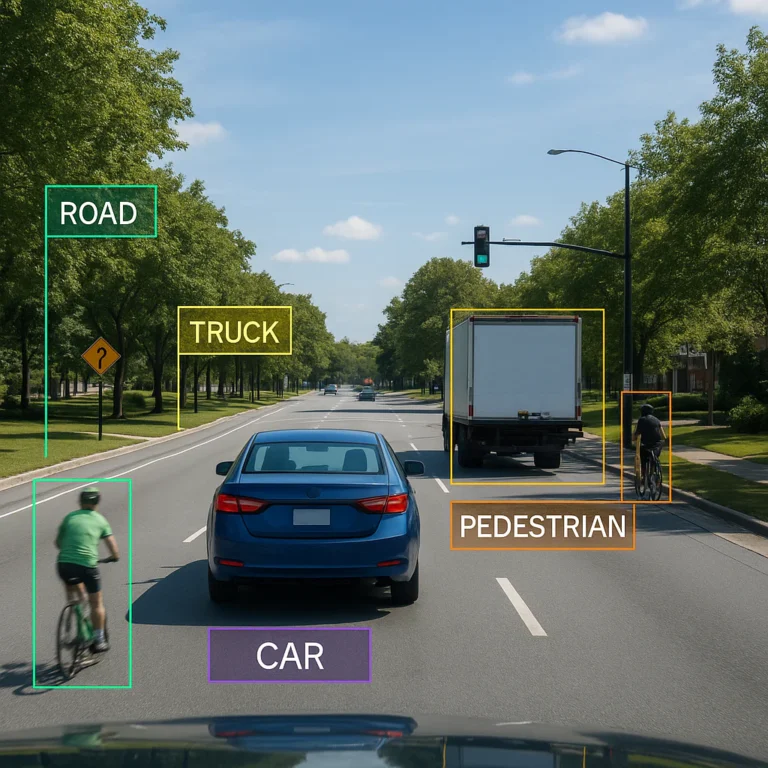
Autonomous-driving datasets often combine camera images with LiDAR, radar, localization, and temporal sequences. They support pedestrian detection, lane understanding, 3D object detection, tracking, and sensor fusion.
- KITI Vision Benchmark Suite provides widely used driving benchmarks.
- nuScenes includes camera, LiDAR, radar, and annotated scenes.
- Argoverse focuses on autonomous-driving perception and forecasting.
- Waymo Open Dataset offers large-scale driving data and challenge tasks.
- Cityscapes is especially useful for street-scene segmentation.
- BDD100K covers diverse driving conditions and tasks.
| Dataset | Notable modality or strength | Typical applications |
|---|---|---|
| KITI | Camera and LiDAR benchmarks | 2D/3D detection, stereo, tracking |
| nuScenes | Cameras, LiDAR, radar, and scene annotations | Sensor fusion and 3D perception |
| Argoverse | Multi-sensor driving data and forecasting tasks | Motion forecasting and perception |
| Waymo Open Dataset | Large-scale annotated driving scenes | Detection, tracking, and motion prediction |
| Cityscapes | Pixel-labeled urban scenes | Semantic segmentation |
| BDD100K | Varied road conditions and video | Detection, segmentation, and driving-scene analysis |
The Wikipedia dataset catalog describes Cityscapes as “Stereo video sequences recorded in street scenes, with pixel-level annotations.” It also describes KITI as providing “Many benchmarks extracted from data.” Those summaries help orient new readers, but rely on each project’s official specification for current splits, modality details, and label rules.
For an autonomous-vehicle task, ask three extra questions: Are sensor timestamps synchronized? Do train and test scenes overlap by location or recording session? Are rare but safety-critical cases represented? A strong overall score can conceal a weak pedestrian or nighttime result.
12. 3D Objects, Point Clouds, and Scene-Understanding Datasets
3D vision datasets may include point clouds, meshes, RGB-D images, depth maps, poses, CAD models, or complete indoor scenes. Examples include ShapeNet, ModelNet, ScanNet, and Matterport3D. Driving benchmarks such as KITI, nuScenes, and Waymo also support 3D perception.
| Resource | Data type | Common use |
|---|---|---|
| ShapeNet | 3D models and category labels | Shape recognition and generation research |
| ModelNet | 3D CAD models | 3D shape classification |
| ScanNet | Indoor RGB-D scans and annotations | Indoor scene understanding |
| Matterport3D | Large-scale indoor 3D scans | Navigation and spatial analysis |
| Rail3D | Railway LiDAR point clouds | Railway scene segmentation and recognition |
Point count alone does not tell you whether a dataset is useful. Annotation consistency, point density, sensor geometry, object coverage, and scene variety matter too. The dataset-list article reports 288 million semantically annotated points for Rail3D and 4.6 billion for WHU-Railway3D. Those striking counts describe different railway resources; they are not directly comparable evidence of annotation quality or model difficulty.
13. Industrial Inspection and Defect-Detection Datasets
Industrial inspection benchmarks help evaluate anomaly detection, defect localization, and quality-control systems. MVTec AD is a prominent anomaly-detection dataset with normal and defective images across industrial object categories. VisA is another visual anomaly dataset.
| Dataset | Best known for | Practical caveat |
|---|---|---|
| MVTec AD | Industrial anomaly detection and localization | Factory-specific defects may differ from benchmark examples |
| VisA | Visual anomaly detection across product categories | Inspect its task setup and split protocol before comparing results |
In real factories, defects may be rare, changing, or costly to label. A benchmark can help you select model families, but a deployment plan should include site-specific samples, acceptable false-alarm rates, line-speed constraints, and an escalation process for uncertain predictions.
14. Agriculture, Wildlife, and Environmental Image Datasets
Environmental vision includes crop disease detection, species recognition, wildlife monitoring, and land-cover analysis. Resources such as iNaturalist, PlantVillage, and camera-trap datasets support different parts of that work.
These datasets often have strong geographic or seasonal patterns. A model may recognize a species in one region but struggle elsewhere, or classify a crop disease accurately under controlled backgrounds but not in a real field. Split by farm, location, camera, or season where appropriate—not simply by individual image.
15. Multimodal, Vision-Language, and Synthetic Datasets
Modern vision research increasingly combines images with text, audio, depth, pose, GPS, or sensor data. Tasks include image captioning, visual question answering, referring-expression localization, image retrieval, and vision-language grounding.
Resources such as Visual Genome, TextCaps, and VQA support different forms of language-linked visual reasoning. The COVE repository also catalogs less conventional modalities, including thermal images, motion capture, radar, EEG, CAD, and audio.
Synthetic data can fill gaps, provide controlled labels, and generate rare scenarios. It can also produce a sim-to-real gap: a model may learn rendering artifacts instead of robust visual features. Validate synthetic-trained systems on independently collected real-world data, and document how synthetic examples were generated.
🏆 Computer Vision Challenges, Leaderboards, and Competitions
A challenge usually specifies a task, dataset split, metric, and submission rules. Some benchmark websites maintain leaderboards; others direct participants to a competition platform or paper. Good places to begin include Papers with Code, the Computer Vision Foundation Open Access repository, Kagle Computer Vision competitions, and individual dataset challenge pages.
A leaderboard score is meaningful only when the setup is comparable.
| Check | Why it matters |
|---|---|
| Same dataset version? | Updated annotations or splits can change results |
| Same split and test protocol? | Validation scores and hidden-test scores are not interchangeable |
| Same metric implementation? | Evaluation code can differ in thresholds or matching rules |
| Similar training data? | External data and pretrained weights can change what the score represents |
| Comparable input resolution and compute? | A model given more pixels or resources may have an advantage |
| Reproducible submission? | Code, weights, and inference details help verify claims |
Our recommendation: Treat the leaderboard as a map of reported results, not an oracle. Read the paper, submission rules, and evaluation code before declaring a winner. For a deeper discussion of these issues, use our computer vision benchmarks guide.
🔎 How to Choose the Right Dataset for Your Vision Task
We’ve seen projects lose weeks because the team picked a famous dataset before agreeing on what success meant. A better approach is to work from the task outward.
Match the Dataset to Your Task and Deployment Setting
Write down:
- Prediction target: class, box, mask, keypoints, text, action, depth, or 3D position.
- Input type: still image, video, thermal image, RGB-D, LiDAR, radar, or a combination.
- Operating conditions: lighting, geography, camera position, motion, season, and image quality.
- Cost of errors: Is a false negative more costly than a false alarm?
- Deployment constraints: latency, device memory, network availability, and privacy requirements.
Then compare candidate datasets against those conditions. If a dataset matches your label type but not your environment, it may be suitable for pretraining or a baseline—not final validation.
The first relevant internal step is to compare your evaluation setup with our guide to computer vision benchmarks. For projects involving organizational deployment, see our coverage of AI Business Applications and AI Infrastructure.
Check Dataset Size, Diversity, and Class Balance
Don’t stop at the headline image count. Check:
- Number of unique scenes, subjects, locations, and recording sessions.
- Class frequencies and the number of examples per class.
- Geographic, seasonal, demographic, and device coverage.
- The rate of missing, ambiguous, or low-confidence labels.
- Resolution, compression, image quality, and capture conditions.
- Whether rare and safety-critical cases appear in the test set.
A dataset with 100,000 near-duplicate frames may offer less useful diversity than a smaller collection drawn from distinct cameras and environments. Ploting class counts and browsing representative samples can reveal issues that a README table won’t.
Inspect Annotation Quality and Label Formats
Review the label schema and sample annotations before committing to a pipeline. Check whether:
- Bounding boxes include truncated objects.
- Masks cover ocluded regions or only visible pixels.
- “Unknown,” “ignore,” and “background” labels are defined consistently.
- Keypoints include visibility or confidence flags.
- Video events have clear start and end boundaries.
- Label formats can be converted without losing attributes.
Common formats include CO JSON, Pascal VOC XML, YOLO text files, LabelMe JSON, and KITI-style annotations. Tools such as CVAT can help inspect or manage annotations, but conversion should always be validated with sample visualizations.
Review Licensing, Privacy, and Responsible Use
Before downloading or redistributing data, read the dataset’s official license and terms. Confirm whether commercial use, modification, redistribution, and derived models are allowed. Also check for personal data, consent limitations, geographic restrictions, and sensitive categories.
For responsible dataset documentation, the Datasheets for Datasets paper offers a useful framework of questions about collection, composition, recommended uses, and limitations. For machine-learning systems more broadly, NIST’s AI Risk Management Framework can help teams structure risk review.
Use the Video Guide Alongside Your Dataset Shortlist
The first YouTube video embedded above, “How to Choose the Best Computer Vision Model for Your Project” by Roboflow, covers model selection, dataset quality, and hardware considerations. It’s a useful companion when you’ve narrowed down the task but still need to think through project constraints.
🛠️ Downloading, Preparing, and Managing Datasets
A dataset is only useful if your team can retrieve it, understand it, and reproduce the experiment. Start with the official source whenever possible; secondary mirrors can be convenient but may have changed files or unclear provenance.
Popular Dataset Hubs and Tools
| Resource | What it helps with |
|---|---|
| Papers with Code | Finding datasets, papers, tasks, and reported results |
| Computer Vision Foundation COVE | Browsing a broad computer-vision dataset catalog |
| Huging Face Datasets | Discovering and loading datasets through common ML workflows |
| Kagle Datasets | Community-hosted datasets and competition resources |
| TensorFlow Datasets | Standardized dataset access for TensorFlow workflows |
| CVAT | Image and video annotation, review, and dataset workflows |
A catalog helps you discover candidates; it does not certify that every entry is current, legally suitable, or correctly labeled. COVE itself invites researchers to contribute datasets that are not yet listed, underscoring that catalogs are living indexes rather than exhaustive guarantees.
Common Image and Video Annotation Formats
| Format | Common use | What to verify |
|---|---|---|
| CO JSON | Detection, segmentation, keypoints, captions | Category IDs, image dimensions, crowd and ignore fields |
| Pascal VOC XML | Detection and classic segmentation workflows | Coordinate convention and object flags |
| YOLO text | Compact object-detection labels | Normalized coordinates, class indexing, image-label pairing |
| LabelMe JSON | Polygon and image annotations | Shape types, label names, image paths |
| KITI format | Driving and 3D perception tasks | Coordinate frame, truncation, oclusion, calibration |
| TFRecord | Efficient TensorFlow data pipelines | Schema, sharding, version and checksum |
Conversion tip: Convert a handful of files, render the output, and compare it to the source labels before processing the entire dataset. A script can finish in seconds; discovering that it swapped width and height on 80,000 images is less fun.
Data Cleaning, Augmentation, and Preprocessing
Use this step-by-step workflow:
- Record provenance. Save the source URL, version, license, download date, and checksum.
- Inspect the files. Identify corrupt images, duplicate files, invalid dimensions, and missing annotations.
- Visualize labels. Overlay boxes, masks, and keypoints on a sample from every class.
- Check duplicates and near-duplicates. Similar frames across splits can inflate evaluation.
- Normalize carefully. Apply consistent resizing and color handling, preserving task-critical detail.
- Augment only the training set. Avoid transformations that make labels incorrect or unrealistic.
- Keep a processing manifest. Record filtering, remapping, and conversion steps.
Augmentation should reflect plausible conditions. Horizontal flips can help some tasks but break text recognition or directional signs. Color shifts may improve robustness—or erase medically meaningful color. Review transformations with domain experts where visual details affect decisions.
For teams building repeatable pipelines, our AI Automation Workflows and AI Infrastructure categories cover related operational considerations.
Train, Validation, and Test Splits
The split strategy can make or break a benchmark.
- Training split: Used to learn model parameters.
- Validation split: Used to choose model settings and compare experiments.
- Test split: Reserved for final evaluation, ideally inspected as little as possible.
For video, split by source video, recording session, person, or location when appropriate. For medical imaging, consider patient-level separation. For aerial imagery, keep nearby geographic tiles together. For industrial data, separate batches or production lines if you need to measure generalization to new conditions.
A random image-level split is not automatically wrong, but it can leak shared subjects, backgrounds, scenes, or capture artifacts. Define the split around the generalization question you actually care about.
📏 Evaluation Metrics and Benchmark Best Practices
Choose metrics that reflect the cost and shape of mistakes.
| Task | Common metrics | What to watch |
|---|---|---|
| Classification | Accuracy, top-k accuracy, precision, recall, macro-F1 | Accuracy can hide poor minority-class performance |
| Detection | AP, mAP, precision, recall | IoU thresholds and class averaging affect interpretation |
| Segmentation | IoU, mIoU, Dice score | Aggregate averages can conceal weak categories |
| OCR | Character error rate, word error rate | Normalization and punctuation rules matter |
| Tracking | MOTA, IDF1, HOTA | Identity consistency and detection quality interact |
| Video action localization | mAP over temporal overlap | Clip boundaries and overlap thresholds matter |
| 3D detection | 3D AP, BEV AP, distance-based measures | Coordinate frame and difficulty tiers must match |
Best practices:
- Report the metric definition and implementation, not just its name.
- Include class-wise results and relevant subgroup results.
- Use confidence intervals or repeated runs when evaluation variance matters.
- Report inference conditions such as input resolution and hardware when claiming speed.
- Keep an untouched test set for final reporting.
- Compare against established baselines using the same protocol.
Benchmark performance is a measurement, not a full description of system quality. A model can achieve high average precision while missing a rare but expensive failure mode. For deployment-focused evaluation, connect the benchmark metric to operational outcomes and human review.
⚠️ Dataset Bias, Leakage, and Common Pitfalls
A high score can be genuine, misleading, or a little of both. Watch for:
- Sampling bias: The dataset overepresents certain locations, people, objects, or conditions.
- Label bias: Annotators apply inconsistent or incomplete definitions.
- Shortcut learning: The model relies on background, watermark, image source, or other correlated cues.
- Train-test leakage: Near-duplicates, the same subject, or the same recording appears in multiple splits.
- Benchmark overfitting: Repeated tuning to a public test set gradually makes that set part of the development process.
- Domain shift: Real deployment images differ from the benchmark in sensor, geography, lighting, or process.
- Unclear license or provenance: The source and permitted uses are not sufficiently documented.
- Metric mismatch: The chosen score rewards performance that does not align with real-world costs.
| Common claim | Better question |
|---|---|
| “The model scores well on CO.” | On which task, split, metric, and training setup? |
| “We have millions of examples.” | How many unique scenes and independent capture sources? |
| “The dataset is public.” | What uses and redistribution does the license allow? |
| “Our test score is excellent.” | Were people, videos, locations, or time periods separated correctly? |
| “The model works in production-like images.” | Has it been tested on a genuinely independent production sample? |
The CVAT article calls ImageNet a “baseline reference for training, validation, and performance benchmarking.” That is a reasonable description of its historical importance, not a claim that ImageNet alone validates every vision system. Likewise, a newer, bigger, or more diverse dataset is not automatically the correct benchmark. The right source is the official dataset documentation for facts, the evaluation protocol for scores, and independent deployment data for real-world confidence.
🔮 Emerging Trends in Computer Vision Benchmarks
Several trends are changing what researchers expect from challenge datasets:
- Vision-language evaluation: Testing whether systems connect visual evidence to text, instructions, and questions.
- Open-vocabulary recognition: Evaluating categories beyond a fixed training label list.
- Multimodal sensing: Combining RGB, depth, LiDAR, radar, thermal, audio, and language.
- Long-tail and rare-event testing: Measuring performance beyond the most common classes.
- Robustness and domain generalization: Testing changes in region, season, device, or environment.
- Video and temporal reasoning: Evaluating motion, event localization, tracking, and long-range context.
- Synthetic-data assessment: Measuring whether generated training data improves performance on independent real data.
- Dataset documentation and governance: Improving transparency around collection, consent, annotation, and permitted use.
Catalogs such as COVE reflect the field’s expansion from standard image labels to tasks involving restoration, visual reasoning, robotics, and multimodal signals. That breadth makes selection harder—but also gives teams better ways to frame a real problem than “let’s train on the biggest dataset and hope.”
For news and emerging research, follow our AI News coverage. For systems that need to connect vision models with tools and workflows, see AI Agents and AI Automation Workflows.